
Plan a garden and watch it bloom
Draw your beds to scale, fill them from a library of 1,785 plants and 139 vegetables, and see the whole garden in 3D at any month of the year. BloomsEye Studio is a free online garden design tool, and you do not need an account to start.
Runs in any browser on a phone, a tablet, or a computer. Nothing to download and nothing to install.
How the garden planner works
Draw your beds
Rectangles, circles, or any shape you like, drawn to scale in feet or meters. Add your house, a fence or wall, a hedge, or a tree that is already there, and the planner draws the shade they cast; shape a bed into a raised bed, a mound or a pond.
Add plants from the library
Search 1,785 perennials, annuals, shrubs, roses, bulbs, trees, climbers and grasses by name, and a Vegetables shelf of 139 crops and named varieties: arugula, bean, beet, broccoli, cabbage, carrot, cauliflower, cucumber, eggplant, garlic, hot pepper, kale, lettuce, melon, onion, pea, pole bean, potato, pumpkin, radish, spinach, summer squash, sweet corn, sweet pepper, swiss chard, tomato, watermelon and winter squash. Every plant carries its mature size, sun and water needs, with bloom months and USDA hardiness zones wherever they apply. A vegetable's card leads with when to plant it, indoors and out, counted from your last frost, with its days to first harvest, its spacing, and whether it wants a stake, a cage or a trellis.
See it grow, and bloom
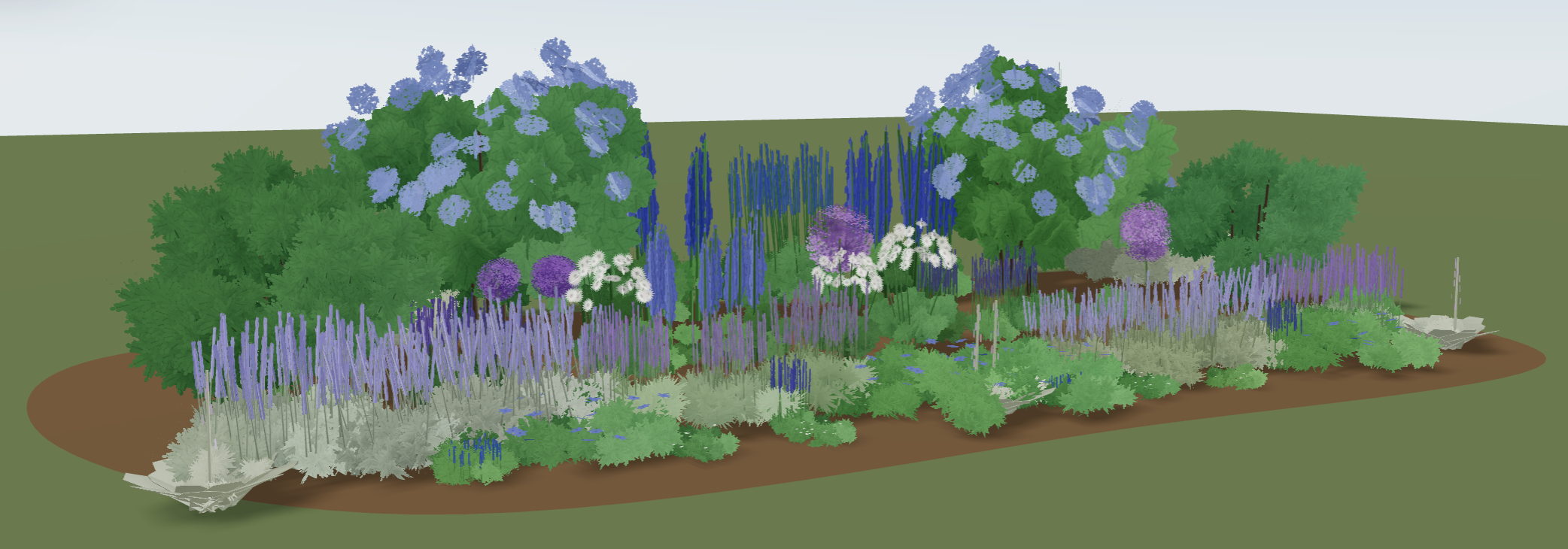
Switch to 3D and walk around your plan. Slide through the months to see what is in flower in June, in September, or in the depths of winter, and watch plants fill in toward their mature size over the years. A vegetable grows through its season the same way, and its fruit appears and ripens on the same clock as its harvest date.
The whole year at a glance. These are real plants from the cool border above:
Check it against your garden
Garden Check reads the plan against the garden it will live in. It flags two plants set too close together, one standing in the wrong light, and one too tender for your zone, and a sprawling squash or pumpkin whose vines would run over a neighbor. Give the garden a zone and it becomes a plant care calendar, listing this month's jobs, from pruning and deadheading to mulching and winter protection. Enter your ZIP and it lists the plants native to your state, wild species first. It also says who the planting feeds, bees, butterflies, hummingbirds, and birds, and which months have bloom but nothing for pollinators. All of it is free.
Free, and what Premium adds
Free
No account needed to start- Every design tool. The 2D plan, the 3D view, and Photo Studio, which places plants into a photo of your own yard.
- The whole library. All 1,785 plants, with their bloom months, sizes, sun, water, and zones.
- One garden on this device, or as many as you like with a free account. An account saves your gardens to the cloud, syncs them to your phone, keeps a saved plant list, and lets you share a read-only link.
- Up to 5 plants placed by hand in a garden. A garden that starts from a guide or a plant page arrives whole, however many plants it holds.
- A care calendar for your plan. Garden Check lists this month's jobs for the plants you placed: pruning, deadheading, dividing, feeding, mulching, and winter protection.
- Native plants for your state. Enter your ZIP and Garden Check lists the library's wild species native to your state, then the garden forms of them, each naming its wild parent, checked against Kew and the USDA.
- Vegetables, with planting and harvest dates. The Vegetables shelf: when to sow indoors and plant out for your zone, days to first harvest, spacing and support, and a harvest date once you give a placed plant its planting date.
Premium
$4.99 a month or $35.99 a year, cancel anytimeEverything in Free, and:
- Unlimited garden plants. Place as many as you like by hand.
- Every plant, named. The Bloom Calendar identifies every plant in flower each month, with photos.
- Every match, with its reason. The complete companion list for any plant, and why each pairs well.
Premium is tied to your account, so it follows you to any device you sign in on. Designing for clients? BloomsEye Pro is the professional side.
The same plant facts as this whole site
The planner runs on the same library you can browse on this site, checked in the open, plant by plant.
Questions people ask
Is there a website where I can plan a garden and watch it bloom?
Yes, this one. BloomsEye Studio runs in a browser with nothing to install and no account needed to start: you draw the beds, fill them from the plant library, and move through the months to see what is in flower and what is not. That last part is why it exists. A plan that looks full in June can be bare in April and September, and the only way to catch that before planting is to look at the bed month by month.
Can I plan a garden with perennials and annuals?
Yes, and a mixed border is the case it is built for. The main library is ornamental: perennials, annuals, shrubs, roses, bulbs, trees, climbers, conifers, grasses, ferns, and culinary herbs, each carrying its bloom months, mature height and spread, sun and water needs, and hardiness zones, with the vegetables on a shelf of their own beside it. Perennials give the bed its structure year to year and annuals fill the gaps, and the bloom calendar is what shows you where those gaps actually fall.
Is this a landscape design tool?
Partly, and it is worth being exact. You draw a garden layout to scale, and you can place a house, a fence or wall, a hedge, or an existing tree and see the shade it casts, so the planting sits in a real yard rather than on a blank rectangle. It is not a hardscape designer: there are no patios, decks, paths, outdoor furniture, or lighting. What it is built for is the planting itself, which plants go where, how much room each one needs, and how the bed reads in every month of the year.
Can it show me which plants are native to my area?
Yes, by state. Enter your ZIP, or use your location in the United States or Canada, and Garden Check lists the plants in the library that grow wild somewhere in your state: the wild species first, then the garden forms of them with each one's wild parent named, and it marks the wild species recorded growing wild in your own county. The range data is read from Kew's World Checklist of Vascular Plants and USDA PLANTS, a garden form is never called native outright, and the list is free for everyone. You can browse every North American native in the library on this site too.
Do I need an account?
No. You can draw a garden, browse the whole plant library, and use the 3D view without one. A free account is what saves your gardens to the cloud and keeps them in sync between the website and your phone.
Is the planner really free?
Yes. Every design tool is free, and a free garden holds up to 5 plants you place by hand. Premium removes that limit and adds the fully identified Bloom Calendar and the complete companion list.
Does it work on my phone?
Yes. The planner runs in the browser on a phone, a tablet, or a computer, and there is nothing to install. A garden you start on one device is waiting on the next once you sign in.
Does it tell me how to care for the plants, month by month?
Yes. Once a garden has a zone, Garden Check is a plant care calendar for the plants you placed: it lists this month's jobs, pruning, deadheading, dividing, feeding, mulching, staking, and winter protection. Jobs group by kind, so five roses are one Prune row rather than five, and it is free for everyone. Where the timing of a cut is not yet verified for a plant, it gives the window and says to check before cutting rather than guess. It does not cover pests or diseases.
What does Premium cost, and can I cancel?
$4.99 a month or $35.99 a year, cancel anytime. Premium is tied to your BloomsEye account, so it follows you to any device you sign in on.
Can I use a photo of my own garden?
Yes. Photo Studio places plants into a photo of your yard, sized to the space. The photo is processed on your device and is never uploaded.
Do I have to know plant names?
No. Start from a guide: every guide's plant list opens in the planner as a ready-made border you can rearrange, and every plant page has an Add to a garden link.
Is this a vegetable garden planner?
Yes, since September 2026, and it is worth being exact about how far. The plant library has a Vegetables shelf beside the flowers: arugula, bean, beet, broccoli, cabbage, carrot, cauliflower, cucumber, eggplant, garlic, hot pepper, kale, lettuce, melon, onion, pea, pole bean, potato, pumpkin, radish, spinach, summer squash, sweet corn, sweet pepper, swiss chard, tomato, watermelon and winter squash, 139 rows in all counting the named varieties. A vegetable's card leads with when to plant it, indoors and out, counted from your last frost, and once your garden has a zone it prints the weeks for your zone; it carries days to first harvest, spacing in the row and between rows, and whether it wants a stake, a cage or a trellis. Give a placed vegetable its planting date and the planner counts to the harvest, one date or a window when the seed catalogs disagree. What it does not do yet: no fruit trees or berries, no companion or rotation advice for crops, and the bloom calendar leaves vegetables out, since they are grown for the table. No vegetable has a page on this site yet; they are named on the verification page, with what each one was checked against.
Where do the plant facts come from?
The library holds 1,785 plants with bloom months, mature sizes, sun and water needs, and USDA hardiness zones. We check it in the open against published botanical authorities, and you can see how far that has got, plant by plant, on the verified plants page. The vegetables were checked before they went in, against university extension services and the seed catalogs, and the same page says exactly what that covered.
Ready to try it?
Open the planner, draw one bed, and drop in a few plants. Nothing to install and nothing to pay.